Speeding up SKOverlay with private APIs
In iOS 14 Apple introduced SKOverlay, a way to display a native 'banner-style' App Store overlay, letting you download another app without leaving the current app (or open it if it's already installed).
1
Fine, or redownload if it's been previously installed. I think those are all the options. Get out of here, imaginary pedants. 
You can trigger it for any App ID if you know the iTunes App Store ID. You can strip that ID from the end of the normal App Store URL, turning https://apps.apple.com/us/app/chess-com-play-and-learn/id329218549 into 329218549 for the Chess.com app, as an example.
3
guard let scene = view.window?.windowScene else { return }

let config = SKOverlay.AppConfiguration(
    appIdentifier: "329218549",
    position: .bottom
)
let overlay = SKOverlay(configuration: config)
overlay.present(in: scene)
The problem is that SKOverlay somehow has to turn a numerical ID into "Chess.com - Play and Learn" and "Online Lessons and Puzzles" and the app icon and the price. That all happens in a network request in .present, which can lead to multiple second delays between trying to present the screen and it actually showing up.
Using the Network Link Conditioner in Developer settings on an iPhone we can turn on "Very Bad Network"
4
Here are the options. 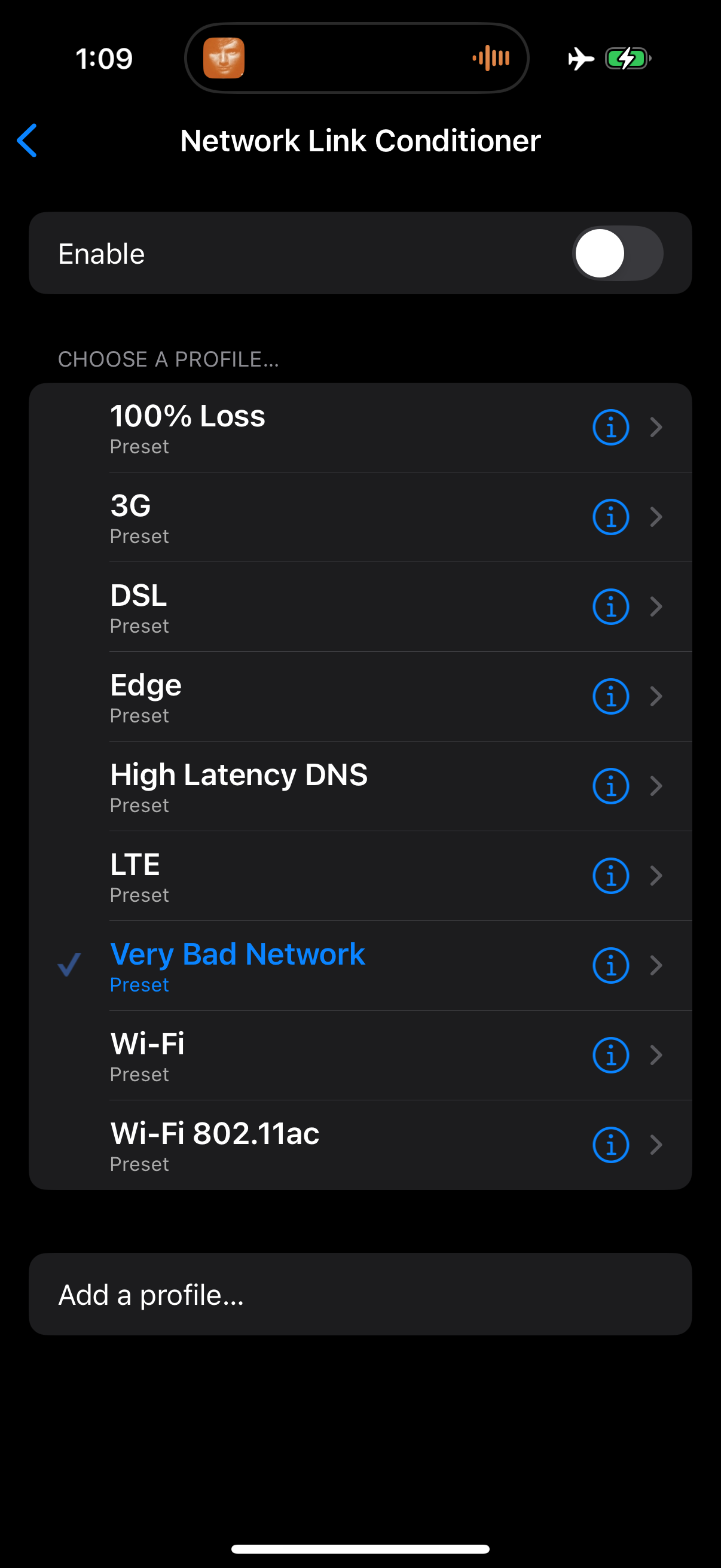 Remember to turn it off after testing, or you'll get really frustrated at your phone until you realize you're to blame. It's certainly never happened to me.
to simulate a bad internet connection
5
I wrote this while on an airplane and I had to purposefully throttle it to get a bad experience! Say what you want about Elon (and you should)—Starlink is incredible.
and try to load the 'Minecraft' app. In this case there's a 3.5 second delay before the screen pops up, and another 2.4 second wait before the app icon appears:
I'm keeping the music in. Go Doja Cat.
That experience isn't great. What's it doing, and is there any way we can speed it up?
How it works under the hood
Luckily all of these libraries are installed in the Simulator, so we can go the Shortcuts route rather than the disassemble a production app route. We can grab the StoreKit binary from the CoreSimulator folder
6
For my iOS 17.4 simulator this lives at /Library/Developer/.
on my Mac and once again load it into Hopper to disassemble it.
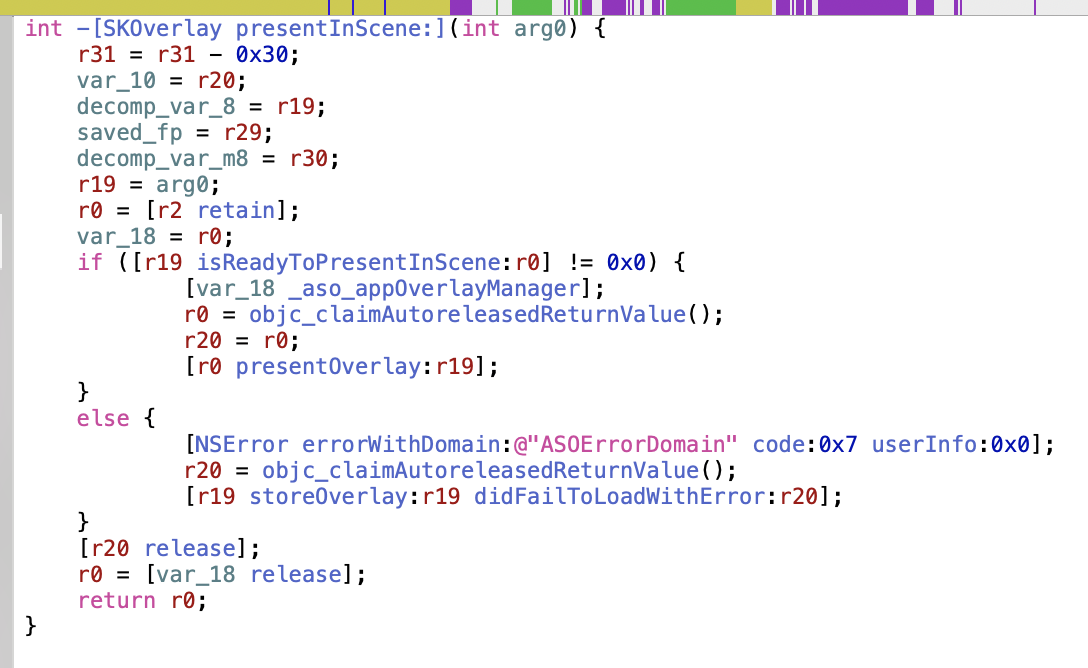
The main function overlay.present(in: scene) is just the Swift-style name for the underlying function, [SKOverlay presentInScene:]. The isReadyToPresentInScene just checks that the app isn't backgrounded, so we immediately call [[scene _aso_appOverlayManager] presentOverlay:self].
The presentOverlay: function is what does the bulk of the work. First, makeViewControllerIfNeeded builds an ASOOverlayViewController that launches
7
loadViewServiceIfNeeded does the heavy lifting here. 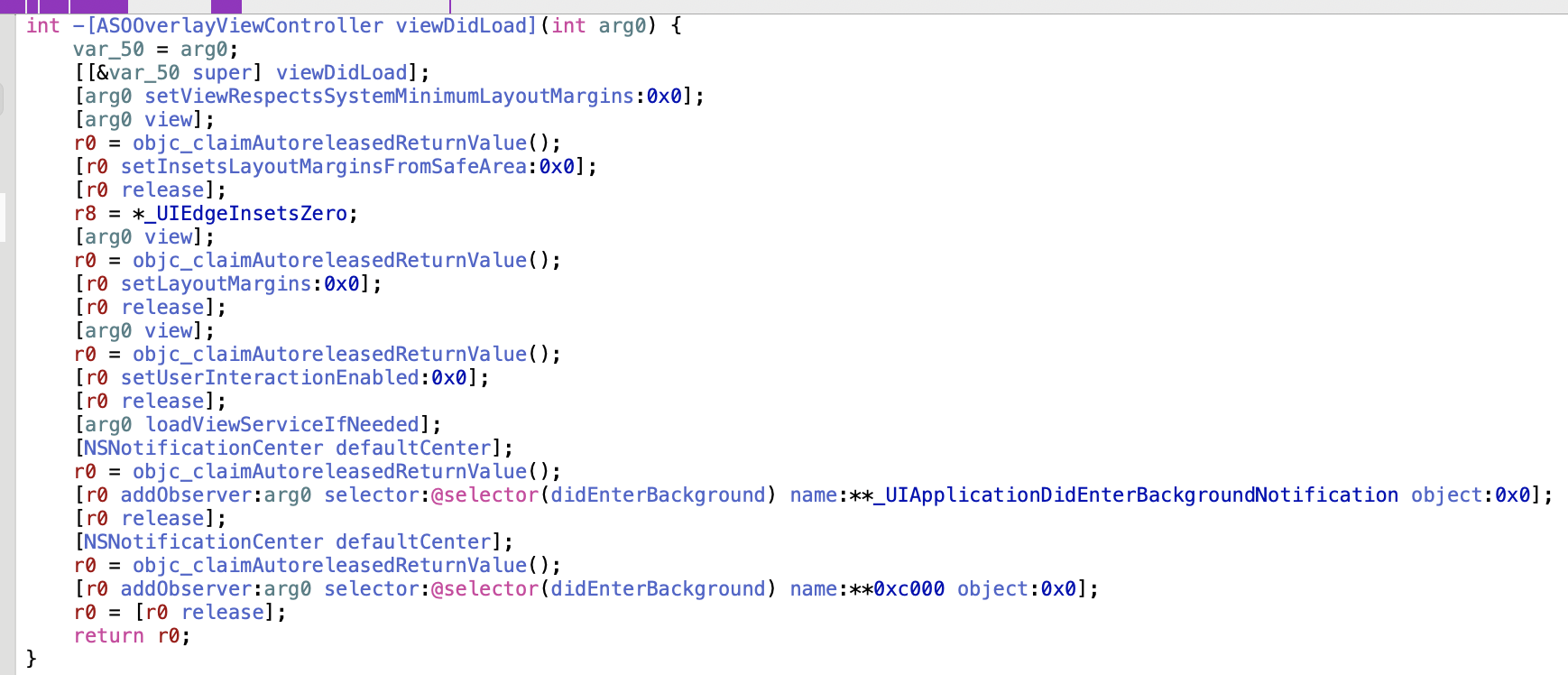 It gets torn down on backgrounding though, so any prefetching only works for the current active session.
a service to handle requests to show the overlay,
AppStoreOverlaysService.
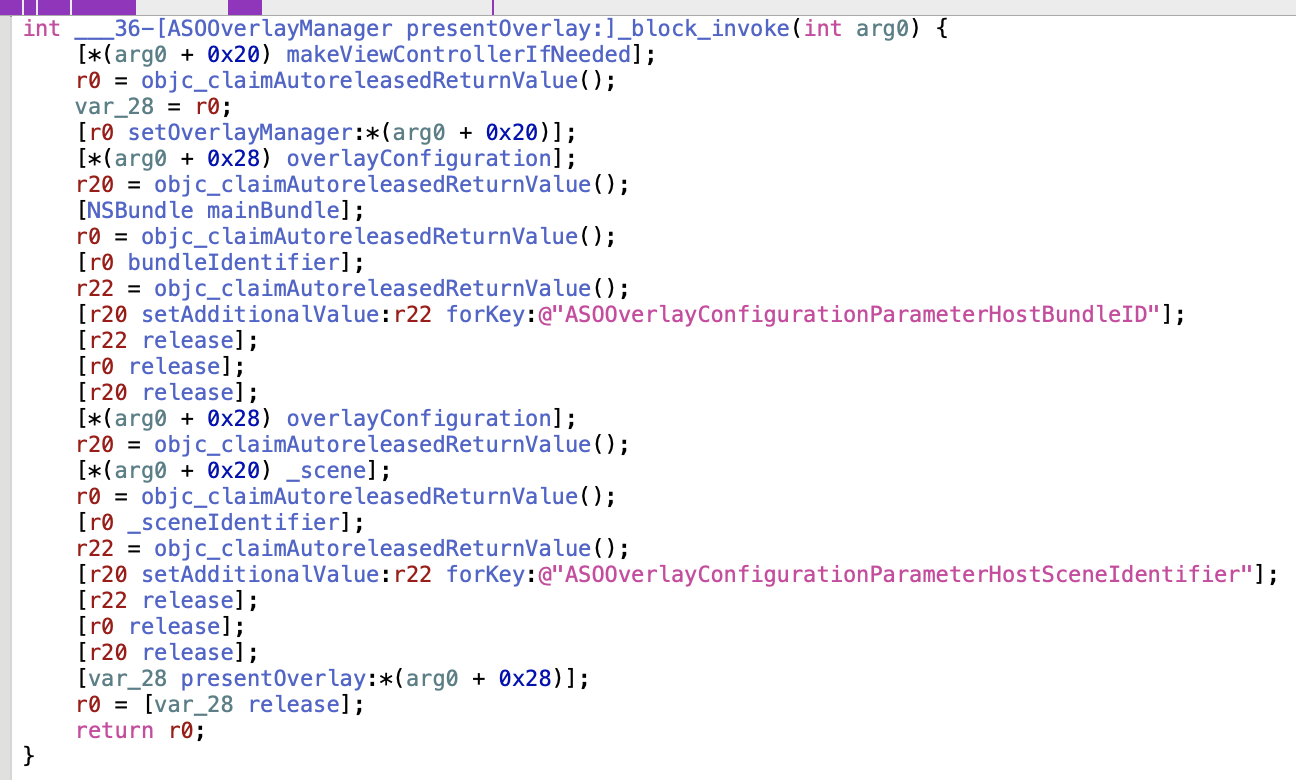
That service is then used to ask a launchd daemon, appstorecomponentsd.

launchd. By default, it enforces a minimum 10-second gap between spawning the same job, which is why if you present an SKOverlay, immediately close the app and reopen it, it takes an extra ~10 seconds to present. Perfect.
com.apple.appstorecomponentsd.xpc, launched by AppStoreOverlaysService
8
That's what actually does the request to populate the Apple info. We can manually trigger the makeViewControllerIfNeeded which launches the AppStoreOverlaysService, but most of the loading time
9
Calling the private API [[scene _aso_appOverlayManager] makeViewControllerIfNeeded] saved around 100ms. Prefetching the daemon was saving multiple seconds.
is the daemon call, not the service startup. And unfortunately the callers to the daemon are locked down, so we can't manually call it.
But the service caches the requests! So if we can initialize it and the daemon with the right request, then the subsequent call will be nearly instant.
"You didn't see anything"
_aso_appOverlayManager comes from the AppStoreOverlays framework. If we pull that into Hopper
10
Same directory, but AppStoreOverlays.framework/AppStoreOverlays instead.
we can see that it's creating the window property as ASOOverlayWindow the first time if it's called.
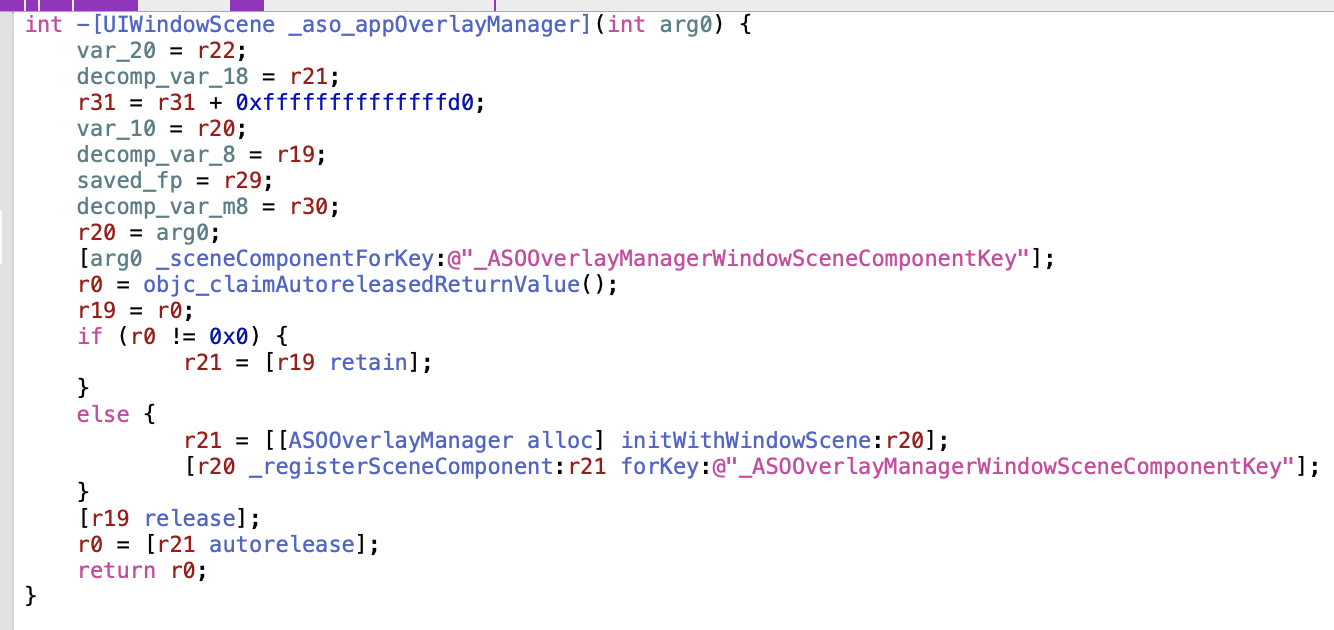
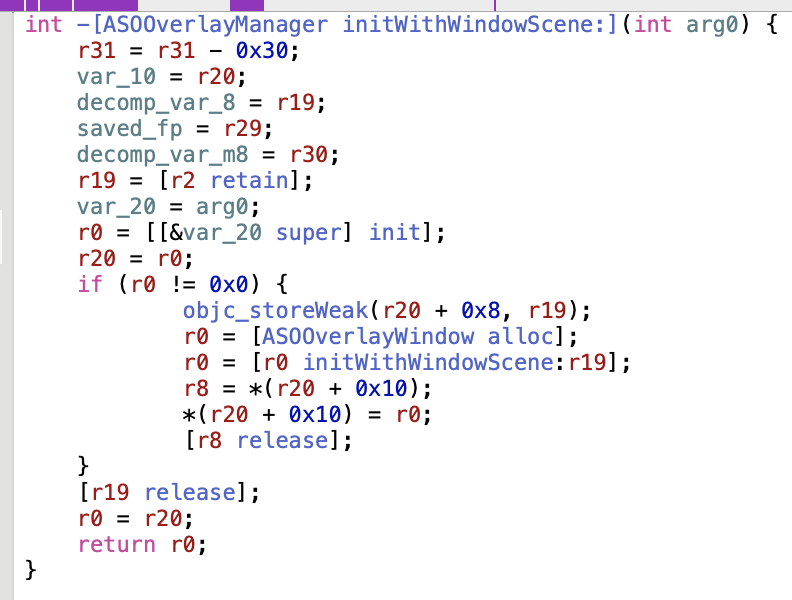
That window is what ends up presenting the overlay. What if we just call the normal function, but tweak the window to be invisible? We can do this with alpha = 0 so the user can't see it, and isUserInteractionEnabled = false so the user can't touch it. Then we can present, and that invisible run will populate the cache for the real run!
let managerSelector = NSSelectorFromString("_aso_appOverlayManager")
guard
    scene.responds(to: managerSelector),
    let manager = scene.perform(managerSelector)?
        .takeUnretainedValue() as? NSObject
else {
    completion?(.unavailable("_aso_appOverlayManager"))
    return
}
guard
    manager.responds(to: NSSelectorFromString("window")),
    let window = manager.value(forKey: "window") as? UIWindow
else {
    completion?(.unavailable("ASOOverlayManager.window"))
    return
}
window.alpha = 0
window.isUserInteractionEnabled = false
overlay.present(in: scene)
It's 'faster'
On the left it shows how slow it is normally. On the right we prefetch first (basically just showing it once before, but invisibly). This makes the actual 'present' trigger near-instant, dropping it from 8,688 ms down to 25 ms. 11 Note that this doesn't make it any faster: the network still has to make the request. This just lets that happen in the background first.
Caveats
There are some caveats!
-
This cache only exists while the app is visible: once it's backgrounded it's wiped, and the prefetching is thrown away.
 Though this shows that there's a secondary HTTP cache, making prefetching speed up requests even after backgrounding (just less)
-
AppStoreOverlaysServicethrottles the requests, capping at 5, and allowing one new request every second. In practice people are only showing one of these, but you will be limited if you're trying to prefetch lots.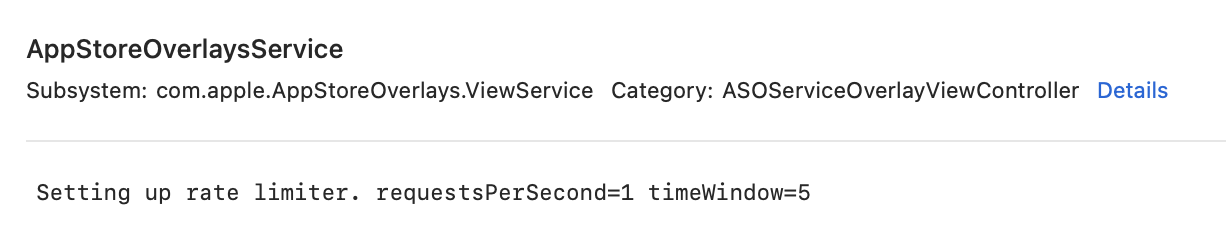 Honestly, pretty reasonable throttle.
-
The prefetching is done when the price and name and subtitle information comes back. It also tries to load the image, but this can take longer. If you trigger too close to prefetching the image may not be fully complete! Presenting for real doesn't reset the load time though. You can see this in the video on the right—there's a brief placeholder before the Bloons 6 app icon fully loads in.
-
This isn't allowed by Apple! This is the main one. In their App Store review guidelines, section 2.5.1, they say "Apps may only use public APIs and must run on the currently shipping OS." Now this sometimes enforced, but not with a very strict hand, especially when it's properly gated, and not doing something clearly malicious. This use case feels benign, and something that Apple likely could create a formal API for in the future (see 2009-era
UIGetScreenImage()discussion). But it is formally against the rules, and I have not submitted an app using it to the App Store!
Give it a shot
If you want to try it, I've created a GitHub repo for it which has the SKOverlayPrefetch.swift library with the simple wrapper for it, along with the demo application that I've been using for the videos in this blog. Let me know if it works, and maybe regardless Apple will add proper support for this in the future!
Just remember: just because something isn't possible doesn't mean it's impossible.
-
Fine, or redownload if it's been previously installed. I think those are all the options. Get out of here, imaginary pedants.
↩︎ -
Hopefully if the New York Times buys Letterboxd they give up on adding TV. ↩︎
-
Here are the options.
Remember to turn it off after testing, or you'll get really frustrated at your phone until you realize you're to blame. It's certainly never happened to me. ↩︎ -
I wrote this while on an airplane and I had to purposefully throttle it to get a bad experience! Say what you want about Elon (and you should)—Starlink is incredible. ↩︎
-
For my iOS 17.4 simulator this lives at
/Library/Developer/. ↩︎CoreSimulator/Volumes/ iOS_21E213/ Library/ Developer/ CoreSimulator/ Profiles/Runtimes/ iOS 17.4.simruntime/ Contents/ Resources/ RuntimeRoot/ System/ Library/ Frameworks/ StoreKit.framework/ StoreKit -
loadViewServiceIfNeededdoes the heavy lifting here. It gets torn down on backgrounding though, so any prefetching only works for the current active session. ↩︎ -
Technically by
launchd. By default, it enforces a minimum 10-second gap between spawning the same job, which is why if you present anSKOverlay, immediately close the app and reopen it, it takes an extra ~10 seconds to present. Perfect. ↩︎ -
Calling the private API
[[scene _aso_appOverlayManager] makeViewControllerIfNeeded]saved around 100ms. Prefetching the daemon was saving multiple seconds. ↩︎ -
Same directory, but
AppStoreOverlays.framework/AppStoreOverlaysinstead. ↩︎ -
Note that this doesn't make it any faster: the network still has to make the request. This just lets that happen in the background first. ↩︎