Modifying requests with mitmproxy
I was recently reverse-engineering parts of the OpenTable API,
1
Unfortunately this probably won't become public, blame the selfish avoidance of the tragedy of the commons.
and wasn't sure how to refresh the Bearer token. We can get the initial one by going through a number of requests: https://mobile-api.opentable.com/oauth/consumer/token to get a logged out token, then through https://mobile-api.opentable.com/api/v1/2fa/start and https://mobile-api.opentable.com/api/v1/2fa/confirm to authenticate through 2FA, and finally back to https://mobile-api.opentable.com/oauth/consumer/token to get an authenticated session token.
{
    "access_token": "61436345-7353-2074-4f6b-456e0a203a29",
    "scope": "CONSUMER",
    "expires_in": 1209600,
    "refresh_token": "72456652-6553-6820-546f-4b654e20293a",
    "token_type": "bearer"
}
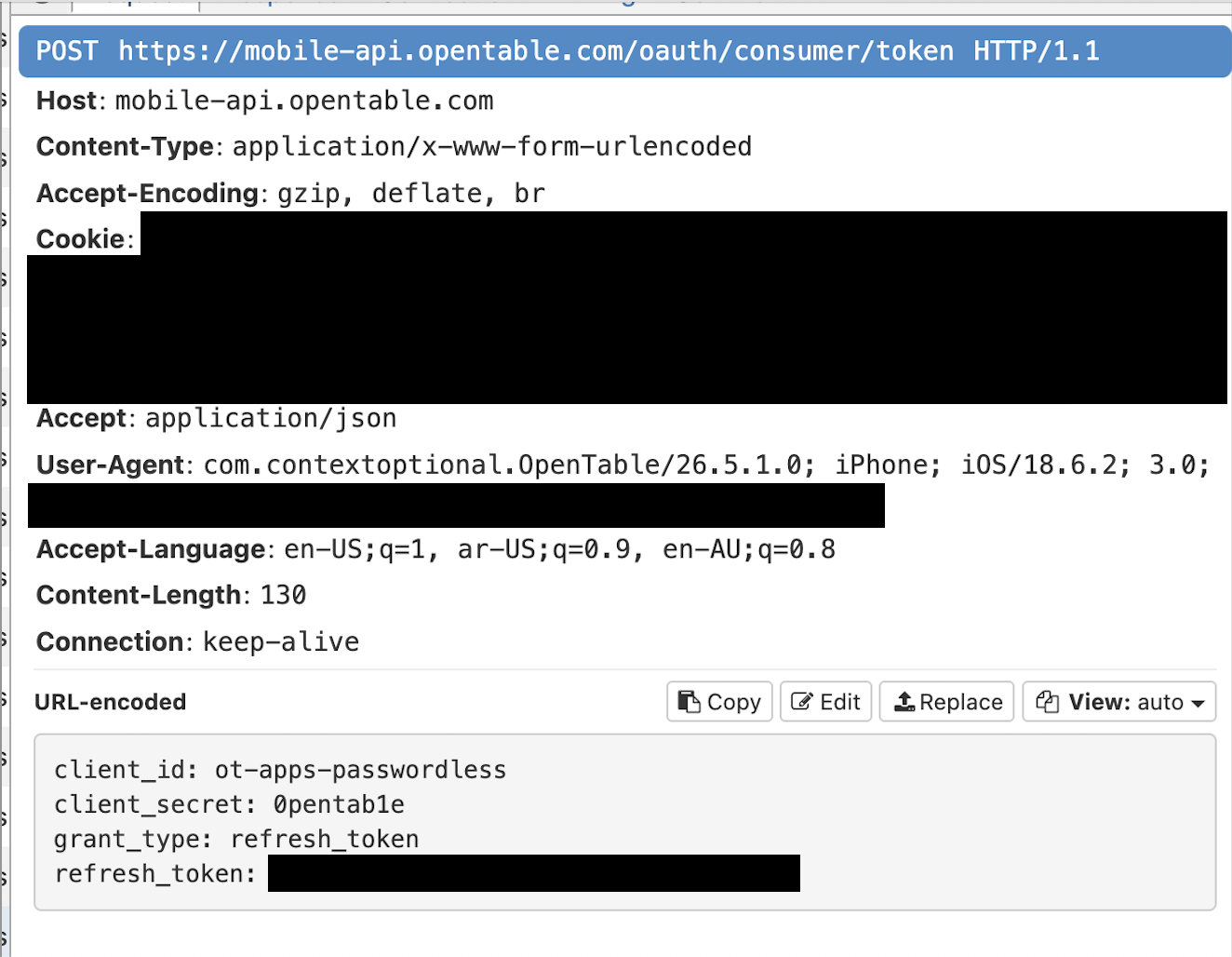
The expires_in field is 1,209,600, which corresponds to 14 days \((14 \cdot 24 \cdot 3600)\). However I'm not entirely sure what format that refresh request takes. How can I make the app trigger it?
Mitmproxy
mitmproxy lives up to its name by not just observing the traffic, but allowing us to modify it.
2
The "mitm" part stands for "man-in-the-middle". Much like Daniel Day-Lewis in There Will Be Blood, we drink (edit) your milkshake (network requests).
If we can hijack the request to https://mobile-api.opentable.com/oauth/consumer/token and change the expires_in field to be short, we can maybe trick the app into refreshing it. While there may be another way to do this, the way I know how is using a Python file.
3
I originally explored this for the Fitness SF QR code writeup to mock some QR code data for the writeup screenshots. This blog is chock full of easter eggs truly just for me.
from mitmproxy import http
import json

def response(flow: http.HTTPFlow) -> None:
  if flow.request.pretty_url.startswith(
    "https://mobile-api.opentable.com/oauth/consumer/token"
  ):
    data = json.loads(flow.response.text)

    if (data['scope'] == 'CONSUMER' and data['token_type'] == 'bearer' and flow.request.urlencoded_form.get("client_id") == "ot-apps-passwordless"):
      data['expires_in'] = 60 # 60 seconds
      flow.response.text = json.dumps(data)
      print('swapped to 60s')
    else:
      print('doesnt match')
Save this as intercept.py and then instead of initializing mitmproxy with mitmweb --listen-port 48640 trigger it with mitmweb --listen-port 48640 --scripts intercept.py. If we log out and then log back in we can see that the expires_in was successfully overridden:
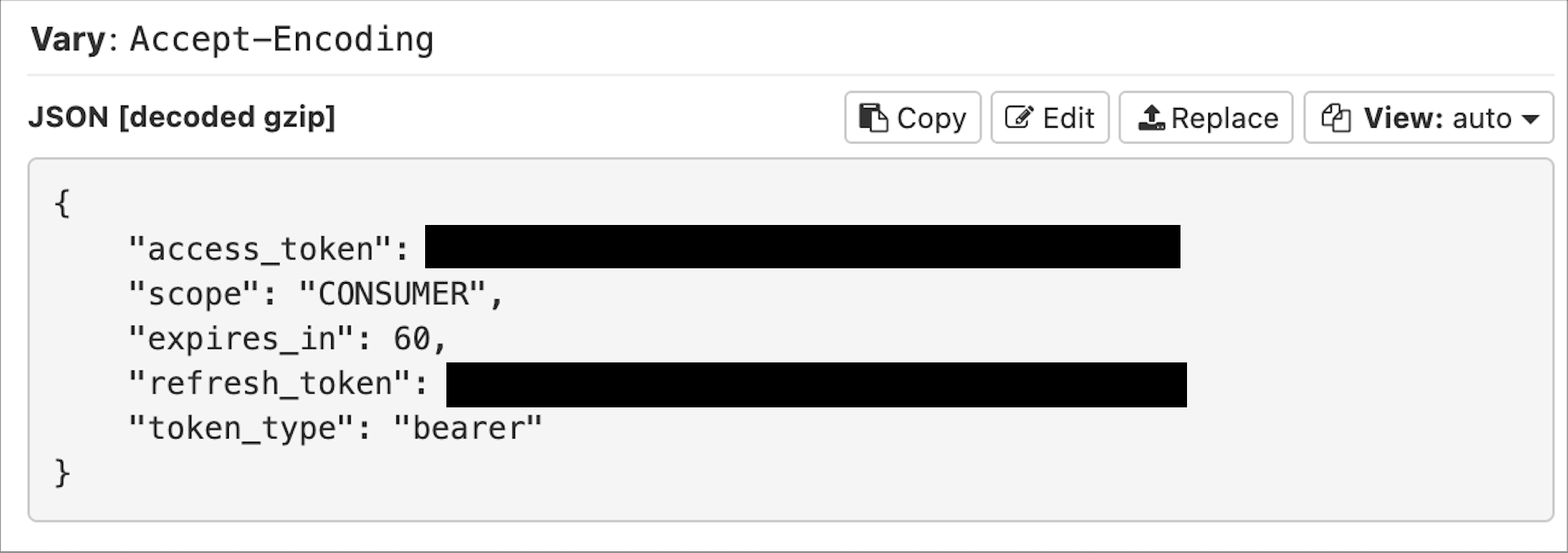
And it worked! If we background and open the app a few times and click around for over a minute we can see the refresh request:
This is a pretty powerful tool. You can also adjust the request before it hits a server by implementing def request instead of def response. Jailbreaking may be dead but maybe, just maybe, we can recreate it in the aggregate.
-
Unfortunately this probably won't become public, blame the selfish avoidance of the tragedy of the commons. ↩︎
-
The "mitm" part stands for "man-in-the-middle". Much like Daniel Day-Lewis in There Will Be Blood, we drink (edit) your milkshake (network requests). ↩︎
-
I originally explored this for the Fitness SF QR code writeup to mock some QR code data for the writeup screenshots. This blog is chock full of easter eggs truly just for me. ↩︎